
This post contains affiliate links. This means I will make a commission at no extra cost to you should you click through and make a purchase. Read the full disclosure here.
If you’re struggling to get eyes on your blog, Pinterest might be the traffic source you’ve been overlooking.
Unlike social media platforms that thrive on followers and trends, Pinterest works more like a search engine, meaning your content can be discovered for months (even years) after you post it.
In this beginner’s guide, I’ll walk you through exactly how to use Pinterest to skyrocket your blog traffic. Whether you’re just starting your blog or looking for a better strategy, this post will show you how to turn pins into pageviews!
How to get Blog Traffic with Pinterest
If you want to get blog traffic from Pinterest, you need to make sure you’re using proper keyword strategies so you can get pins ranked in search and show up on people’s homepages.
Step 1: Keyword Research on Pinterest
If your pins aren’t getting seen, chances are you’re not using the right keywords or not placing them where Pinterest looks for them.
Pinterest is a visual search engine, so keywords are how the platform knows what your content is about. The goal is to use terms people are already searching for, so your pins show up in search and on home feeds.
How to Find Keywords on Pinterest:
- Use the search bar
Start typing a topic related to your blog (like “budgeting tips” or “meal prep”). Pinterest will auto-fill suggestions based on what people are actually searching. These are your keyword ideas.
- Check the keyword bubbles
After you hit search, you’ll often see colorful bubble filters at the top. These are long-tail keyword extensions and other keywords you can use to get found on Pinterest.

Spy on top-performing pins.
Look at the pins ranking for your target keyword. What words are in their titles and descriptions? Make a note of patterns, so you can replicate them!
Where to place keywords on Pinterest
Finding the right keywords is just the first step. To actually rank and get traffic, you need to use those keywords in the right places. Such as:
Your Pinterest Profile
- Name + Bio: Add your main niche or keywords. Your bio should also naturally include keywords. You can see mine below
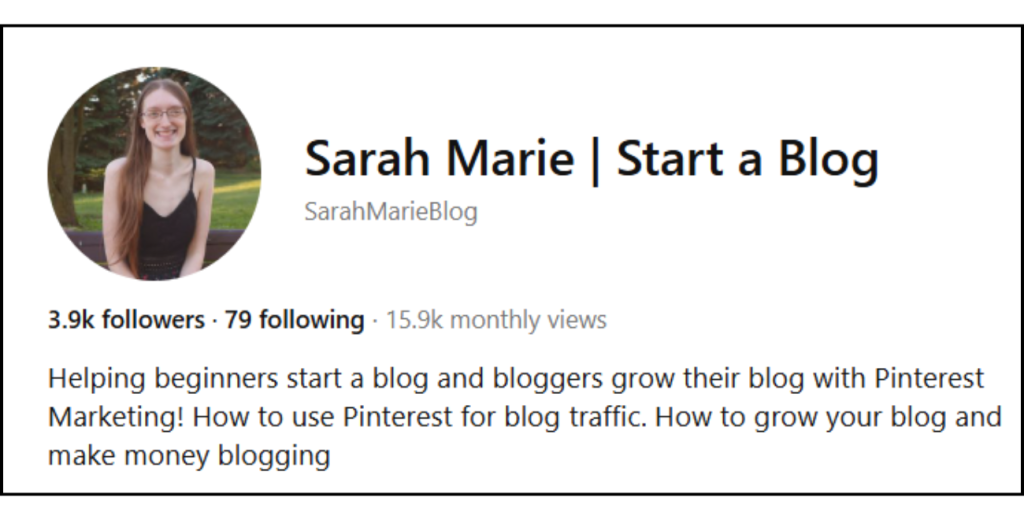
Board Titles & Descriptions
- Board Titles: Keep them clear and keyword-rich (e.g., “Pinterest Marketing Tips” instead of something vague like “My Faves”).
Pin Titles
- Your pin title should include the main keyword you’re targeting. Don’t be afraid to switch them up as well. And make sure to keep them interesting while including the keyword!
Pin Descriptions
- This is huge for Pinterest SEO. Use multiple keyword phrases naturally so that you can rank for more than one.
- Each time you write a description, switch it up a bit and target different keywords for the same link so you can get found with multiple keywords!
Want more help with Pinterest? Check out the Free Pinterest Starter Kit below!
Design Pins That Get Clicked
Even with perfect keywords, your pins won’t get clicks if they don’t look click-worthy. Pinterest is a visual platform, and your design is what stops the scroll.
What Makes a Good Pin Design
1. Vertical Format (2:3 ratio)
Pinterest recommends 1000 x 1500 px. Vertical pins take up more space and stand out.
2. Clear, Bold Text
Your title should be easy to read at a glance. Use large, bold fonts and avoid script fonts for key info.
3. Strong Headlines
Use your blog post title or a variation that sparks curiosity or solves a problem.
Examples:
- “10 Pinterest Tips That Doubled My Blog Traffic”
- “How I Went from 0 to 10K Pageviews Using Pinterest”
4. Consistent Branding
Stick to your brand colors, fonts, and style so your content becomes recognizable.
5. Use High-Quality Images or Backgrounds
Avoid clutter. Choose clean backgrounds that don’t compete with your text.
Tools to Use:
Canva is the go-to for pin design. Use templates, or create a few custom ones to reuse for a faster workflow.
If you’d rather not have to create pin templates for yourself, check out these right here! I created a starter pack with 95 different pin templates, perfect for beginners!
Track what’s working
If you want to grow faster on Pinterest, you have to pay attention to what’s actually getting results. The platform gives you data, so make sure you’re using it!
Look at your Pinterest Analytics
Look at your top-performing pins. Which ones are getting the most outbound clicks (not just impressions)? This tells you what your audience actually cares about enough to leave Pinterest and visit your blog.
Key metrics to watch:
- Outbound clicks – how many people visited your site
- Saves – shows interest and helps content spread
- Engagement – They engaged with your pin in some way (Save, comment, etc…)
- Impressions – what’s being shown (but not always clicked)
Make sure to look for patterns so you can replicate the success or determine what’s not working.
- Are certain pin designs or colors doing better?
- Are some topics always ranking higher?
- Is there a time of day or week when your pins perform best?
The more you pin, the more results you’ll have to look from, so make sure you are pinning consistently, trying out new designs to see what works best, and stick with a strategy for 3-6 months before changing it up.
It’s easy to get discouraged on Pinterest because results tend to take a while, and the work you put in now may not be reflected right away.
But if you get frustrated and stop pinning, or you switch up your strategy too soon, you’ll mess up your results, and you won’t know what worked and what didn’t!
💡Quick Tip
Don’t forget to use Google Analytics too! Check where your Pinterest traffic lands and what they do once they’re on your blog.
If you want an easy way to keep track of all your blog posts, keywords, and other things for Pinterest, check out the Pinterest Starter Kit down below!
It has my Pinterest keyword tracker, 10 free Pinterest templates, and a mini-ebook included as well to help you get started on Pinterest!
You can sign up for free right here:
Pinterest can be one of the best free tools for growing your blog traffic if you use it strategically.
By doing proper keyword research, optimizing your profile and pins, designing scroll-stopping graphics, and tracking what’s working, you set yourself up for consistent, long-term growth.
Remember, Pinterest is a slow burn. Stick with your strategy, stay consistent, and give it time. The effort you put in today can pay off for months (or even years) to come.
Start with one blog post and create 3–5 optimized pins for it using the tips above, then build from there. Your traffic won’t skyrocket overnight, but if you keep showing up, it will grow!





Leave a Reply